

Tenet

Your design standards, checked automatically.

Tenet is one place for your team’s design rules, personas and research. It checks your live pages, your Figma frames and your copy against them — and shows you exactly what broke, and where.
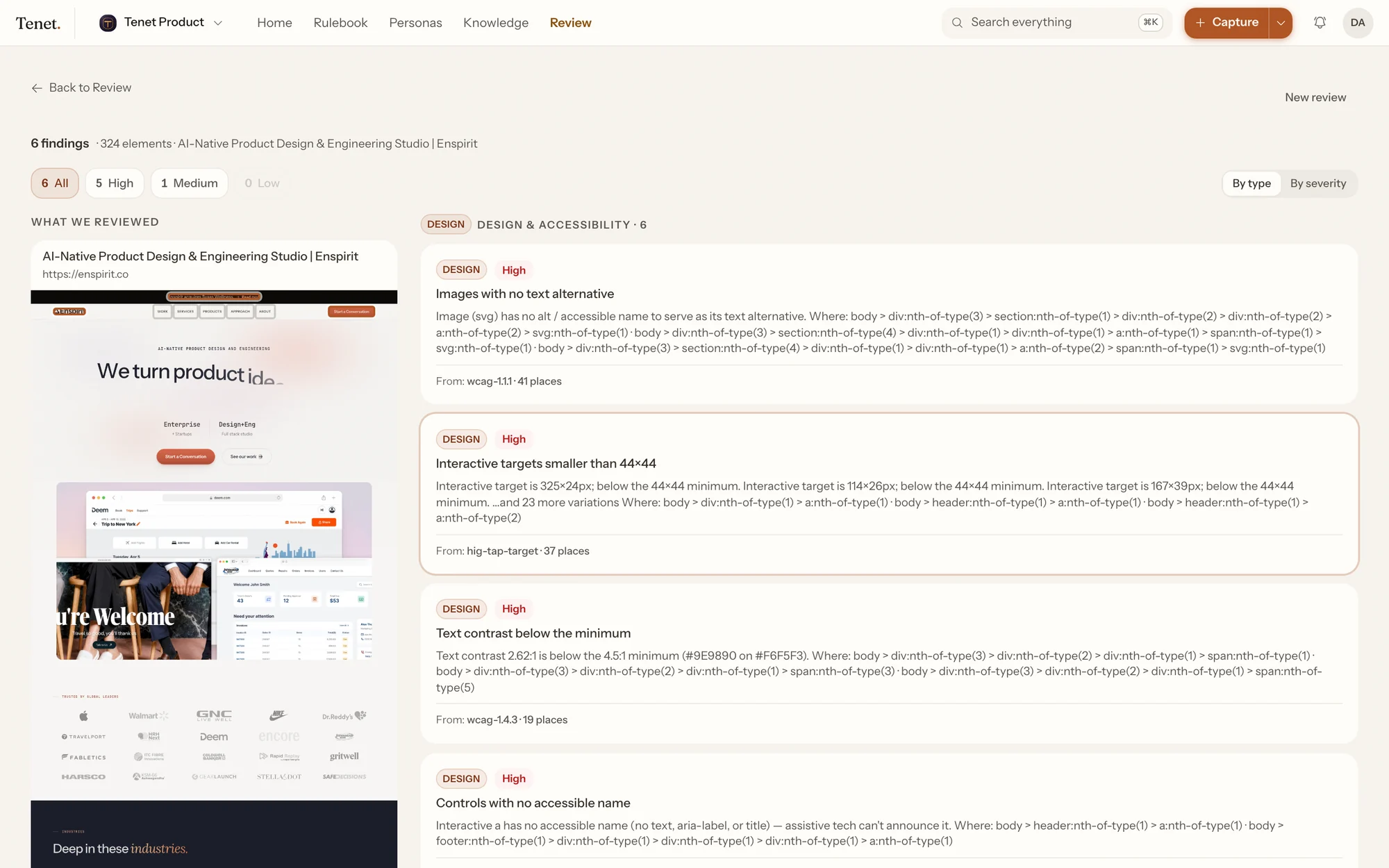
Tenet's review results: a full-page screenshot with findings outlined on it, and the findings grouped by rule alongside.
A real check of enspirit.co: six rules broken in 132 places, each one marked on the page where it happens.

The rules already exist. Nobody checks them.

Every team writes down its design standards and who it is building for. Then the product changes and the document doesn’t. Nobody is at fault — nothing tells them. So the same mistakes ship again, and the persona everyone quotes stopped being accurate months ago.

How it works

Three things, and a loop between them.

Most tools stop at the first box. The part that makes this worth having is the arrow that comes back.

1

What you learn

  • Interviews and usability sessions
  • Calls and meeting notes
  • Specs, reports, wiki pages
  • Something you just worked out
2

What your team agreed

  • Rules, with a severity
  • Personas, and the research behind them
  • Journeys, step by step
  • Decisions, and why
3

What you ship

  • A live page
  • A frame in Figma
  • The words on it
  • Whatever your AI tools write

And what breaks tells you something you didn’t know — which goes back in at step 1.

  • The loop is the product. A finding can be saved as something the team now knows. New research can contradict a persona and say so. A rule can come from a decision you made last month.
  • You can start anywhere. Most teams start at 3 — check a page you already shipped — and work backwards.

Review

Paste a URL. See what’s broken.

Tenet opens the page in a real browser, measures every element on it, and checks each one against the rules your team chose.

324
elements checked
132
problems found
6
rules behind them
~15s
start to finish
A full-page screenshot of enspirit.co with the elements that broke a rule outlined on it.

Pick a rule — every place it happens lights up.

Real output from a real review of enspirit.co. The page is 12,697 pixels tall; these are the 131 places a rule was broken.

The same findings inside Tenet, listed beside the page they came from.
The same thing, inside Tenet.
  • One problem, not thirty-seven. If a button is too small in 37 places, that is usually one component used everywhere. Tenet groups them so you fix it once.
  • You can find each one. Every result points at the exact element, and marks it on a screenshot of the page.
  • Only your rules run. Tenet checks the rulebooks your team chose — so a clean result actually means something.
  • Words as well as pixels. Your copy is checked against your tone of voice, and optionally as a specific customer at a specific moment.

Personas

Personas that tell you when they’re out of date.

Most personas are written once and quietly go stale. Here, every line keeps a link to the research behind it — so when that research changes, the persona says so.
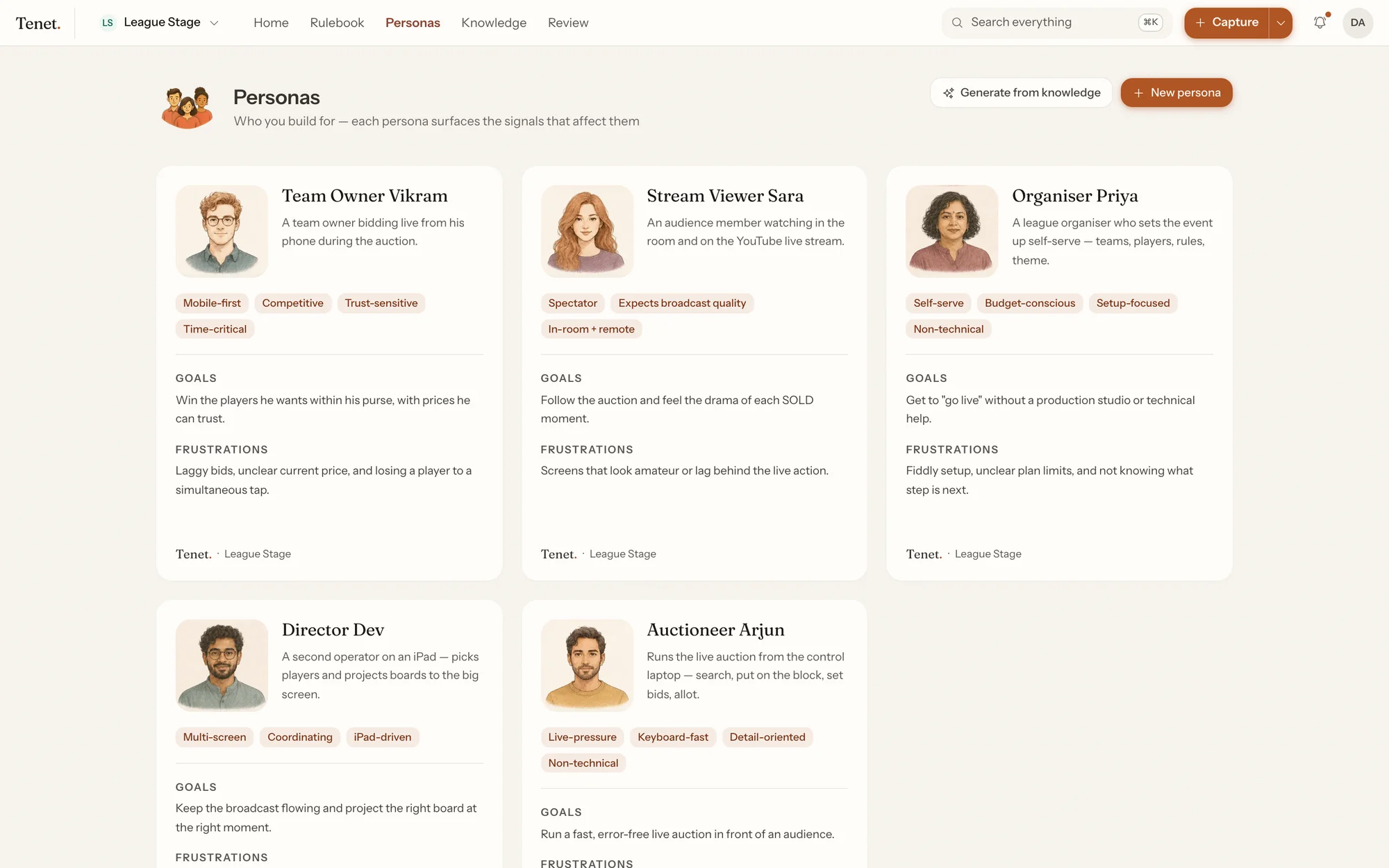
Five personas in Tenet, each with a portrait, traits, goals and frustrations.
Five customers for one product, each showing the research that applies to them.
  • When the research changes. The line is flagged, with the old wording shown next to the new one.
  • When new research disagrees. Tenet shows you both sides and asks someone to decide which is right.
  • It flags — it doesn’t rewrite. Deciding what is true now is a judgement about a real person. That stays with you.

Where it fits

What Tenet doesn’t do.

It isn’t another place to write things down. Two of those is worse than one.

Confluence, Notion
Still where your long documents live. Tenet reads from them and links back to them.
Figma
Still where you design. Tenet’s plugin just checks your work inside it.
Jira
Still where you track work. One click turns a problem into a ticket.
Tenet
The rules and the people you build for — in a form that gets checked automatically.
When you don’t need it
Three designers who talk every day don’t need this. It earns its place when there are more people, more screens and more change than anyone can hold in their head.

Everything else.

Nothing lands unreviewed

Anything AI writes waits in a queue for a person to approve or reject.

Every check is saved

The page, the results and the screenshot — including the checks that found nothing.

Works inside Figma

The same rules, checked on a frame, without leaving the file.

Who can do what

Four levels, from read-only to admin, enforced on the server rather than just hidden.

One company, many projects

Company-wide rules apply everywhere; each project’s work stays its own.

Your data stays yours

Every request is checked twice — once in the app, once in the database itself.

Access you control

Give a tool a key that only does what you allow, and switch it off whenever.

A record of everything

Who did what, and whether it was allowed. Never stores a password or key.

See what AI costs

Every request is measured and priced, so there are no surprises on the bill.

Sign in with Google or Microsoft

Your existing company login works.

Run it yourself

Your database, your storage, your servers, if that is what you need.

Getting started

Fifteen minutes to something useful.

  1. Turn on a rulebook. WCAG and Apple's guidelines are already there — adopt one and you have something to check against.
  2. Review a real page. Paste the URL of something you have already shipped. Not a test page — the point is to see what is actually true.
  3. Read the top finding. If it is worth fixing, this will work for you. If it is pedantry, tell us: that is the more useful answer.

After that: add one persona, connect wherever your research already lives, and put the check in CI so nobody has to remember. The designer's handbook walks through each of those. There is more of the product in the tour.

Talk to us

Send us a page you have already shipped.

We will run it and send back what Tenet found — the real findings, including the ones that turn out to be pedantry. That is a faster way to judge this than any demo, and it costs you one email.

Nobody has to remember.

The rules get checked where the work happens — in the browser, in Figma, in the editor. Not when someone thinks to go and look them up.